RecoverPoint 5.0 SP1 New Features

DellEMC has released RecoverPoint 5.0 SP1 and below are the features listed from the release notes.  ScaleIO Support is big!!!

ScaleIO support

RecoverPoint can be used for heterogeneous replication of ScaleIO volumes.

 Partially restoring a consistency group

The partial restore feature allows the user to specify production volumes of a consistency group to restore to production, without affecting production volumes that are not specified. In this version of RecoverPoint, partial restore is only supported when restoring production on an XtremIO array from a replica on an XtremIO array or a Data Domain system.

 XtremIO single snapshot: deleting and expiration policies

RecoverPoint 5.0.1 introduces the ability to delete a single XtremIO snapshot at a copy; and to change the retention time policy of a single XtremIO snapshot at a copy.

New features in RecoverPoint 5.0

DellEMC just released RecoverPoint 5.0. Listed below are the new features that you can find in the release notes of RecoverPoint 5.0.

Remove volume from a consistency group without journal loss

Volumes can now be removed from a consistency group without incurring journal loss. Adding volumes to a consistency group that are larger than the capacity of the journal will no longer cause the system to enter one-phase distribution mode.

Dynamic network interface assignment

This feature allows the user to select various network topologies that combine different traffic types (for instance, LAN and WAN) on the same network adapter. Reducing the number of ports reduces the number of IP addresses that need to be configured and alleviates some restrictions on network configuration (for instance, LAN and WAN will not necessarily have to be on different subnets). The user may also choose to have each traffic type on a dedicated network adapter as before.

Dynamic IP configuration

RecoverPoint 5.0 introduces the option of automatically assigning all RecoverPoint IP addresses except the cluster management IP address using the network DHCP server. This significantly reduces the work of installing a new RecoverPoint RPA cluster.

XtremIO enhancements

XtremIO enhancements include:

  • One to three consolidation policies can now be specified for each copy of a consistency group that resides on an XtremIO array.
  • XtremIO copy volumes can now be expanded on storage without triggering a pause in replication for the whole consistency group. In RecoverPoint 5.0, when a replication set is expanded on storage, RecoverPoint automatically re-configures the replication set to protect the expanded areas and updates the volume size.
  • Snapshot consolidation has been simplified and it can be customized through Unisphere for RecoverPoint as well as the CLI.
  • Dynamic LUN resizing.

ProtectPoint 3.5 partial recovery

When using RecoverPoint 5.0 with ProtectPoint 3.5 and later, specific volumes of a consistency group can be selected for production recovery, while others volumes in the group are not recovered.

Gen6 Hardware diagnostics

RecoverPoint 5.0 introduces error messages that identify a faulty fan or power supply on Gen6 hardware. These error messages allow replacing only the faulty unit.

Support for new event types

RecoverPoint release 5.0 generates events for arrays.

Language packs

Users no longer need to download and install the Unisphere for RecoverPoint language packs from the EMC Online Support site. The RecoverPoint 5.0 language packs are now built-into the product.

Serviceability 

Serviceability improvements include:

  • The ability to collect partial system information specified by the user
  • Reducing the size of collected system information
  • A Change Management file that is older than 30 days prevents installation/upgrade and facilitates downloading an updated file
  • System Reports (SyR) mechanism identifies the product type (physical or virtual) and tracks first installation date and time
  • Users can specify the RPAs from which to collect logs
  • Downloading collected logs from a browser when the RPA is detached
  • Not forcing users to provide FTP server information when collecting logs from a detached RPA
  • Customer procedures on Solve Desktop are now customer viewable: Solve Desktop gathers critical information from EMC product guides to generate a concise procedure document.

RecoverPoint 4.4 SP1 New Features and Changes

RecoverPoint 4.4 SP1 has just been released and I wanted to post the New Features and Changes

Gen6 support

The Gen6 RecoverPoint appliance supports all of the functionality supported by the Gen5 appliance. Gen6 appliances support:

  • Improved system performance
  • Flexible configuration of I/O modules
  • 10 Gb Ethernet environments
  • Customer replacement of disk drives and power supplies

Unity Support

RecoverPoint now supports the Unity Midrange platforms.

Online help

Online help has been added for ProtectPoint users. ProtectPoint users can now select Help > ProtectPoint for XtremIO Help to open the ProtectPoint help. Clicking the help icon of a specific GUI element while a group with a Data Domain copy is selected will display the ProtectPoint-specific help.

Java™ 8

RecoverPoint Appliances now run on Java 8.

CCA.xml download page

System installations and upgrades for customers without Internet connectivity are simplified now that the customer can download the Installation Change Management XML file.

Axxana end of service life

As of RecoverPoint 4.4.1, the Axxana Phoenix system is not supported.

New Features and Changes in RecoverPoint 4.4

One of the many technologies that i work with on a regular basis is EMC RecoverPoint. Code 4.4 was just released and i wanted to share the new features and changes.

ProtectPoint 3.0 readiness

RecoverPoint now contains the infrastructure required to support ProtectPoint 3.0 when it becomes generally available. This readiness enables ProtectPoint 3.0 to support the protection of data located on XtremIO arrays. See the ProtectPoint 3.0 Solutions Guide and the ProtectPoint 3.0 Primary and Protection Storage Configuration Guide when they become available for more information on the RecoverPoint integration in ProtectPoint.

Volumes can be added to groups without journal loss

When adding replication sets to an existing consistency group, the journal history is retained.

IPv6

RecoverPoint 4.4 has been qualified for use with IPv6 addressing. IPv6 is supported for all endpoints on the LAN, the WAN, gateways, subnets, VNX arrays, CX4 arrays, and XtremIO arrays.

EMC WAN Optimization Components (EWOC)

EWOC is not supported in RecoverPoint 4.4. If EWOC was enabled in a RecoverPoint version prior to 4.4, it will be automatically disabled during upgrade to RecoverPoint 4.4.

Multiple array support for XtremIO

The RecoverPoint/SE license now supports multiple XtremIO arrays per cluster.

Allow RecoverPoint to Manage Volume Access

Since XtremIO replica volumes are not managed by a RecoverPoint splitter, they are normally accessible, even when image access is disabled. External hosts accessing replica volumes can cause data corruption. From XtremIO 4.0.2 and later, RecoverPoint manages the access state of these volumes, and blocks write access to hosts, unless the volumes are in Image Access mode.

Auto-registration enhancements

Many enhancements have been added to the RecoverPoint automatic registration mechanism. Among them, a call home event is now automatically sent to the EMC IB group whenever a cluster removed from or added to the system, and whenever a change is made to one of the details in the registration form.

Improvements in system feedback during image access

When accessing, failing over to, or recovering production from an image to a point in time that does not contain all of the replication sets that exist at the current point in time, new messages (and alerts) are now displayed to help users better understand the implications of image access.


New security features

Key management

Random SSH keys are generated during a new RecoverPoint installation and regenerated every time the regenerate_encryption_keys command is run.

Authentication secrets management

During RecoverPoint installation, you will be prompted for the local users’ security level. There is no default value. When Security Level is set to High, passwords of predefined users (admin, security-admin, and Boxmgmt) must be changed immediately. LDAP authentication is not affected.

Session inactivity timeout

By default, a RecoverPoint GUI session will time out after 10 minutes. After timeout, user will need to log on with password to access GUI again. Session timeout can be changed by user with security role privilege.
Configuring EMC RecoverPoint GEN5 BMC or “Lights Out Management”

One of the options with RecoverPoint GEN5 appliances is the BMC option or what most known as “Lights Out Management”.  This can be very useful as IT offices and Datacenter’s where the equipment reside may be in different locations.  Below are the steps for setting up BMC on each RPA.

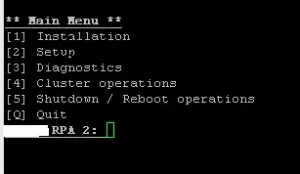
Login with user “Boxmgmt” and choose Setup [2]

screenshot.1

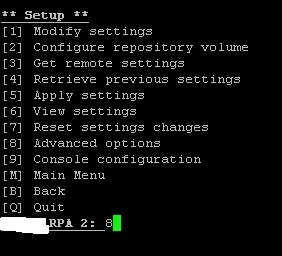
Choose Advanced Options [8]

screenshot.3

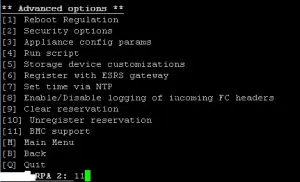
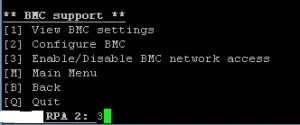
Choose BMC Support [11]

screenshot.4

First enable the BMC Network Address [3]

screenshot.5

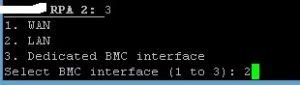
Select the interface you want to use BMC

screenshot.6

BMC will be enabled.  Make sure not to disable it.

screenshot.7

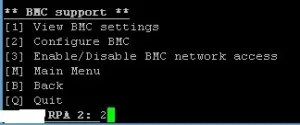
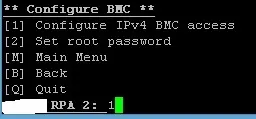
Now that BMC is enabled you need to configure the IPs [2]

screenshot.8

Configure IPv4 BMC Access [1]

screenshot.9

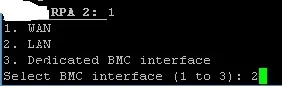
Select the BMC Interface that you enabled before

screenshot.10

Specify the DHCP option

screenshot.11

Specify IP

screenshot.21

Specify Mask

screenshot.12

Specify Gateway

screenshot.13

The operation will take about 60 seconds or so

screenshot.14

Confirm activating the IP

screenshot.15

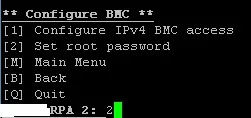
Last Step is to specify a Root Password [2]

screenshot.16

Enter password

screenshot.17

Confirm Password

screenshot.18

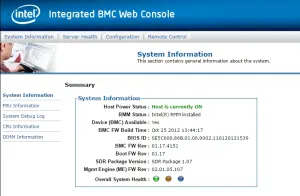
At this point you can now login to the BMC or “Lights Out Management” by browsing to the IP. Login with the Root account created.

screenshot.19

You can now manage the RPAs with BMC

screenshot.20

RPA Communication Security Level

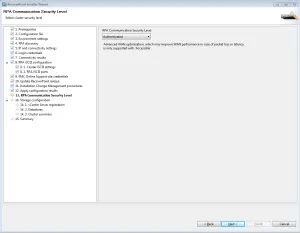
I was recently installing RecoverPoint and I ran across something that I have never seen before.  During the Deployment Manager setup step 13 is “RPA Communication Security Level”.

RP Security WAN

RecoverPoint 4.1.1 now supports Message Passing Interface (MPI) security for communication between RPA clusters. RecoverPoint MPI security offers the following RPA communication security levels:

Accessible – Communication between RPA clusters is not authenticated or encrypted. However, RPA clusters can communicate with each other only by adhering to the RecoverPoint proprietary protocol.

Authenticated – RPA clusters use certificates to authenticate each other before communicating. This option minimally impacts RPA performance.

Authenticated and Encrypted – RPA clusters use certificates to authenticate each other before communicating. All communication between RPA clusters is also encrypted.

RecoverPoint 4.1 Product Enhancements

RecoverPoint 4.1 Product Enhancements

One of the many technologies that I get to work with on a regular basis is EMC RecoverPoint.  It has continued to evolve as the years have passed.  Code version 4.1 was released a few months ago and I wanted to go over a few of the major new enhancements.

  • MetroPoint Support
  • Snap-based Replication
  • I/O Throttling
  • External Storage Support

MetroPoint Support

Before MetroPoint, RecoverPoint was used to protect VPLEX distributed volumes, via replication, to a third site. However, RecoverPoint only protected one site of the Metro for a distributed volume. If the site performing replication to the remote site went down, hosts could access the distributed volumes but continuous data protection wouldn’t happen. MetroPoint, eliminates this problem because replication can switch over to the other site and continue to replicate to the disaster recovery site. When this happens, a source switchover occurs with only a short init phase.

Snap-Based Replication

In RecoverPont 4.1, snap-based replication can be used to replicate point-in-time snapshots asynchronously from production to target.  Benefits in doing snap-based replication are reduced traffic transmission and lower RTO.  This will also provide better journal utilization.

Requirements for Snap-Based Replication

  • All RPAs must be 4.1 or higher
  • Storage array must be registered the Storage wizard
  • VNX OE must be Block 32 or later
  • RecoverPoint Splitter
  • VNX Snapshot enabler
  • VPLEX is supported

I/O Throttling

I/O throttling regulates I/O during Init/Full sweep initialization to prevent burdening the storage array due to heavy I/O activity by RecoverPoint.  I/O throttling support has been extended to support individual storage arrays meaning the throttling value can be different for different storage arrays involved in the replication process.

External Storage Support

You now have the option of provisioning Journal volumes from within the Consistency Group Wizard directly from Storage Pools on the VNX.  This can be done once the Storage has been registered in Unisphere for RecoverPoint.  This allows for an easier administration of RecoverPoint Journal Volumes.  Block 32 or higher is supported

There are few smaller enhancements listed below.

  • Policy Templates – This allows for user-defined policies when it comes to the copy or link policy for each CG
  • HTTPS is now the default GUI access
  • RecoverPoint Check for registered RPAs – Lets you know if an RPA is registered or not
  • Logs can be collected form a detached RPA
  • More languages have been added

As you can see RecoverPoint continues to get better and makes Disaster Recover more feasible.